If you want ACT to notify you of a birthday, simply enter an activity with the activity type set as Birthday. You can set the date of the birthday as the due date, the time as Timeless and set an alarm if you choose. You can then filter or sort on Birthdays in the Task List or just rely on the alarms
Alternately, in ACT! 2008 and above, you can use the Group called, Upcoming Birthdays. This group automatically brings up contacts who have birthdays with the next 14 days. If you would like to change it to the next 7 days, simply change the membership rule. You can also add the spouse birthday to this or create a separate group.
Go to Groups> Choose Upcoming Birthdays on left side.Choose the Contact tab on right side
Choose the Add/Remove Contacts button on the Contact tab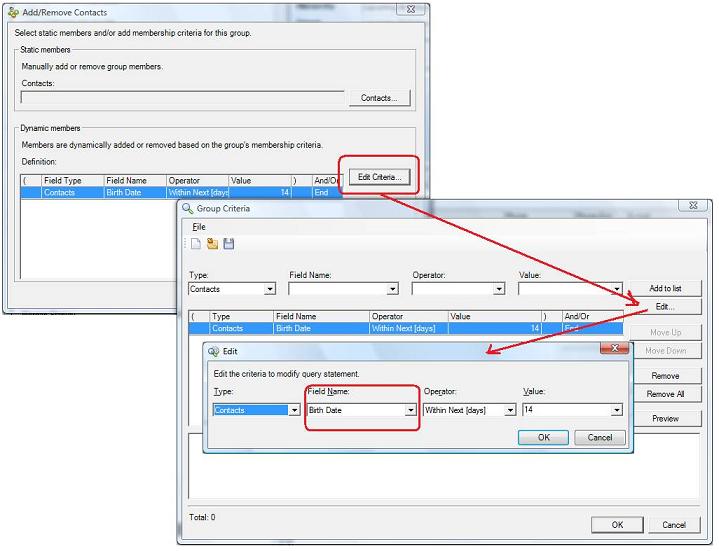
For Birthdays, you may add Birth Date (Contact), Birth Date Sp (Spouse), Birth Date (Contact), Child1DOB (Dependent 1), Child2DOB (Dependent 2), Child3DOB (Dependent 3), Child4DOB (Dependent 4), Child5DOB (Dependent 5), and Child6DOB (Dependent6).
When you are ready to find those who are having birthdays. Go to View Group/Companies located on the top right corner in ACT and choose Upcoming Birthdays.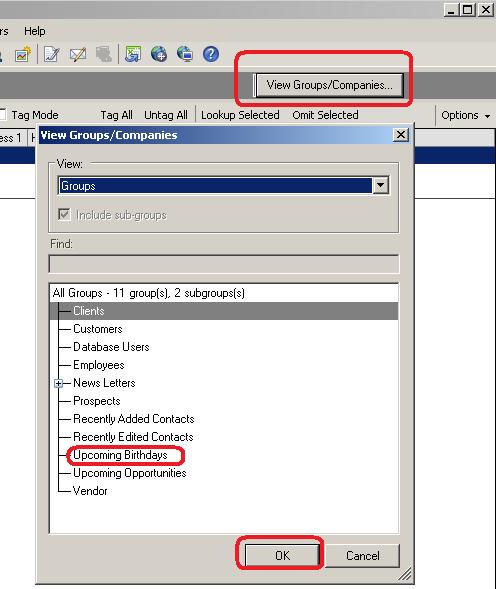
In this example I found three records with birthdays within the 14 days. I then highlighted all records on the Contact List and went to Schedule, Other, and chose Birthday. This will schedule a birthday activity.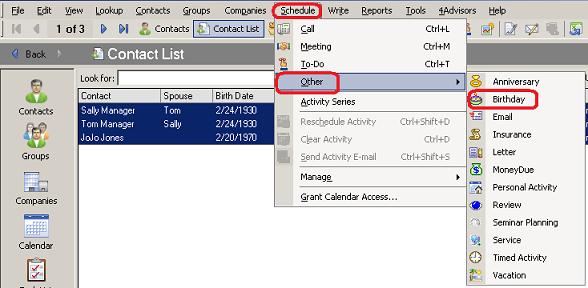
Optional Information:
How do change the columns on the Contact List and print a simple list?
http://act4advisors.com/docs/ContactList.html